No Results Found
The page you requested could not be found. Try refining your search, or use the navigation above to locate the post.


 Estimated reading time: 9 minutes
Nearly every publisher, no matter how big or small, has guidelines for manuscript submissions. Green Hill Publishing is no different. Read this blog and learn about our submission guidelines and how to use our templates.
Green Hill have developed submission guidelines to simplify the process of bringing your manuscript into our design software for typesetting. It ensures that we have the same understanding of your content as you do. Our designers can then focus more on the readability and design of the book. Having a submission guideline makes sure nothing gets lost in translation and can help cut down the need for design revisions, making the process smoother and often faster.
If you submit your manuscript without using our template and style guide, or if you have incorrectly used the template and style guide, we will flag this with you and give you a couple of options moving forward.
The first option is to allow you to reformat the manuscript and submit a new version to Green Hill. This gives you the chance to correct it yourself and ensure that everything is formatted in the way you are happy with.
The second option is for one of Green Hill’s Microsoft Word specialists to go through your manuscript and format it. This is done at an hourly rate and will be extra on top of your publishing package. It’s also good to note that, in the case of complex manuscripts (i.e. business books, textbooks, etc.), the specialist styling your manuscript may misinterpret headings etc in your book.
Of course, if you are having any trouble understanding the template, or you can’t work out what the most suitable option is for your book, contact us so we can guide you.
When you open the word template from your Green Hill Submission Guideline Documents folder, it will look mostly blank.

Firstly, what you’re going to do is to click “Enable Editing” in the banner up the top of document. This will allow you to make changes in the document. Then, you must get into the settings to set the document up properly to allow for the formatting. Go to “File” and click on “Options”.

This will bring up a pop-up. From there, go to “Advanced,” scroll down to “Cut, copy, paste,” and change “Pasting between documents” to “Merge Formatting” and click “OK.”

Now that the settings have been successfully altered, you need to open your manuscript document up in a separate window and copy and paste all of the text. If you’re comfortable with keyboard short-cuts, use Ctrl+A to highlight all of the text.
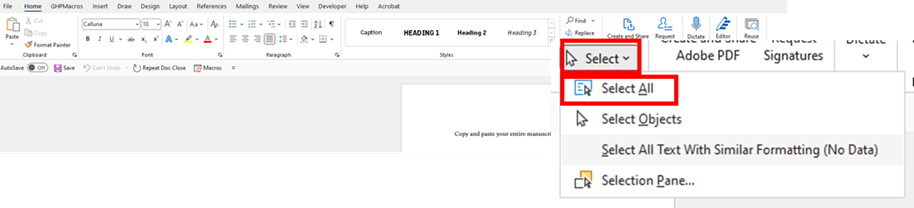
Alternatively, if you’re not comfortable with short-cuts, you can use the “Select All” button. First, go to the Home tab and find the “Select” dropdown. Then click on “Select All”.
If you’ve written your manuscript in multiple files, open them one at a time, select and copy all the text, and paste it into our word template in the correct order. It’s important to note the last part of those instructions as the team at Green Hill will assume you’ve ordered your manuscript correctly.
Next, you’ll need to open your styles pane. To do this, go to “Home,” and click the downwards arrow in the styles section. The Styles Plane will open to the right of the screen.

You’ll then need to ensure that you are only seeing the styles that we have recommended as Word has its own inbuilt styles that we don’t need. To do this, go to the style pane and click “Options,” then choose “Recommended” from the first dropdown menu and click “OK.”
Now it’s time to use the styles to format your manuscript!
For fiction authors, applying styles to your manuscript should be straightforward as you shouldn’t have too much differentiation of text in your manuscript. However, for authors with complex manuscripts like business books, some non-fiction books, textbooks, etc. the process of deciding which style to use can get a little tricky.
At the end of the day, it is okay if you choose the wrong style so long as you are CONSISTENT.
Keep a notepad next to you and write down what styles you’re using for particular elements of your text. This way, if you’ve chosen the wrong style, the team at Green Hill will be able to switch it out for a more appropriate one much easier.
If you’re not familiar with styles in Microsoft Word, don’t be daunted! We will go through how to use them step-by-step and if you still don’t quite understand, there is an instructional video you can watch.
Firstly, open up the Styles Guide document from your Green Hill Submission Guideline Documents folder. It’s a PDF which has a lot of information about how to set up your document for styling, how to use styles, and a styles A-Z. Right now, we’re interested in the Styles A-Z chapter, so skip down to there.
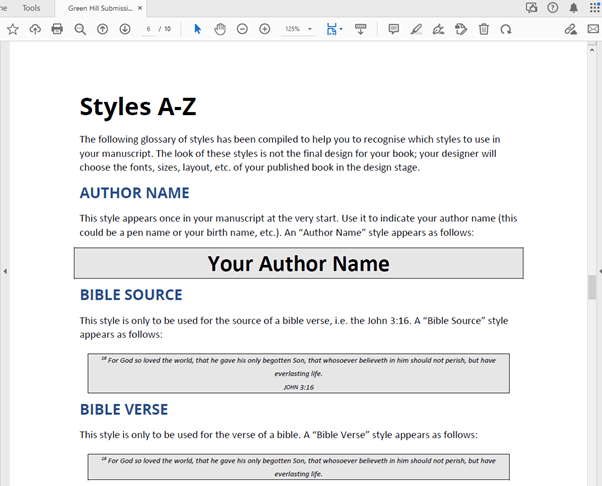
The Styles A-Z chapter runs through every style in your template and what it is typically used for. As your final design of your book won’t look like your formatted manuscript, don’t worry too much about the look of the styles. When deciding on a style, it’s always best to choose based on their described use.
When getting ready to use styles, it’s a good idea to either print out the Styles A-Z chapter or to have your screen split between these two documents. This is so that you can view both at the same time, allowing you to quickly reference the styles A-Z document while you format your manuscript.

Have a scroll through the different styles and make a note of which ones look appropriate for your manuscript. Once you’ve done that, it’s time to finally get formatting!
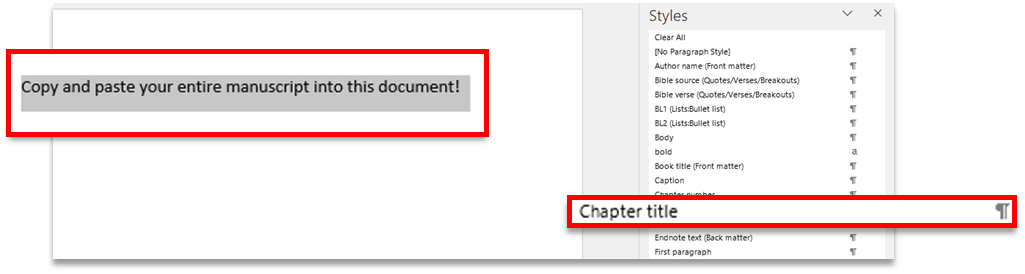
To apply a style, highlight the paragraph you want to change and then scroll through the styles pane until you find the appropriate style, then simply click on it. Go through the whole manuscript and do this for every paragraph.
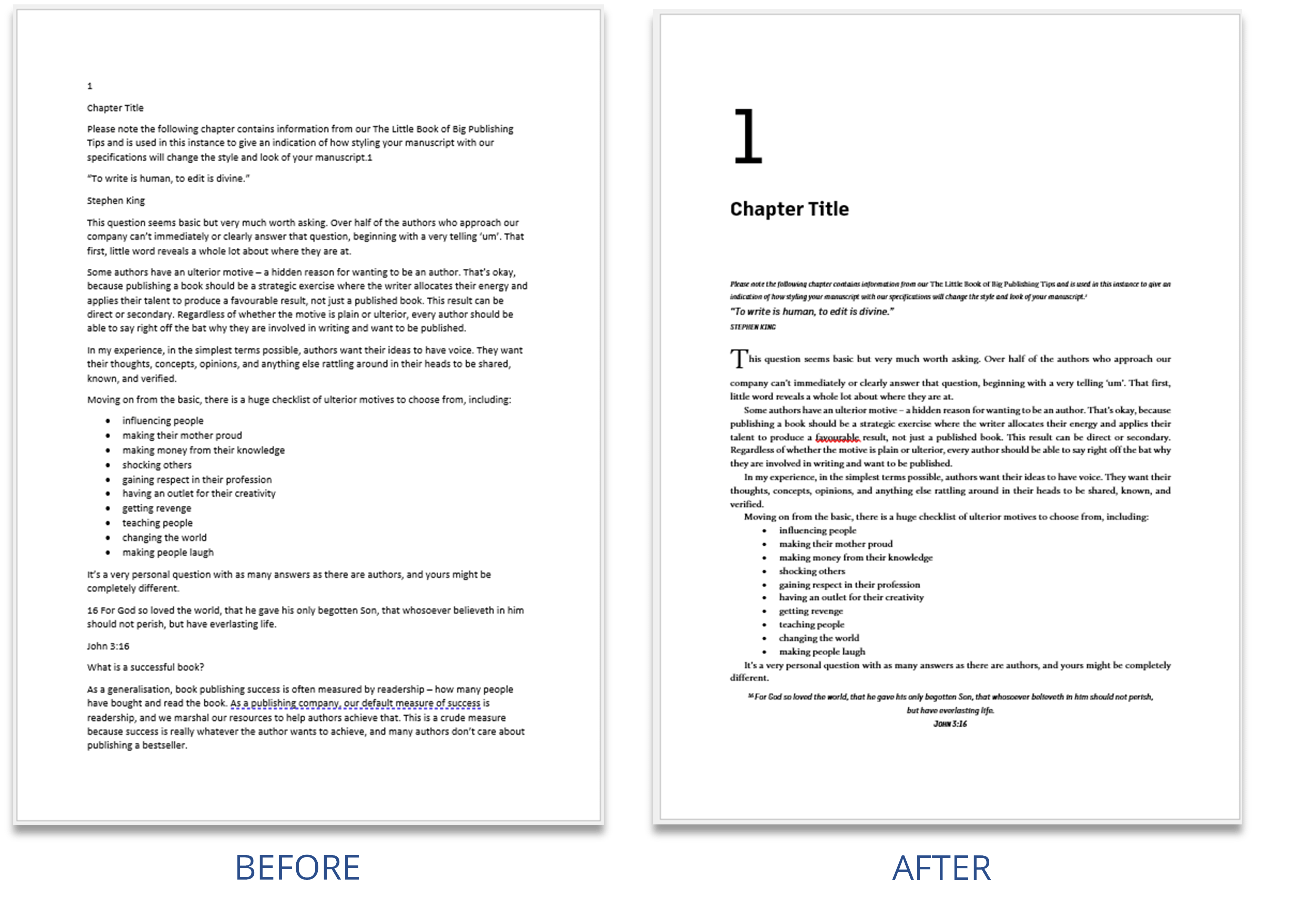
On our company website, we have a webpage dedicated to submitting your manuscript. It briefly details the steps that need to be undertaken and also features a helpful video tutorial that will walk you through the process.
You can find this webpage here: https://greenhillpublishing.com.au/submit-your-manuscript/
The page you requested could not be found. Try refining your search, or use the navigation above to locate the post.
The page you requested could not be found. Try refining your search, or use the navigation above to locate the post.


Estimated reading time: 5 minutes
Practically every book will have at least one error, and many will have even more. Books can go through numerous rounds of edits before they’re printed and readers will still pick up on something that is incorrect. Why is this?
The process of accepting and rejecting edits in a manuscript can introduce errors into the manuscript that weren’t already there.
We find that one of the best practices authors can do after receiving their edited manuscript is to save two versions and globally accept all changes in one version. This ensures that there are no introduced errors in that manuscript, but that you can also return to the manuscript with the edits shown and see the choices that the editor has made.
You might be familiar with the proofing tip of printing out your book and reading it on paper to catch any mistakes you may be overlooking when reading it on a screen. But why does this work?
The difference between reading on a screen and off physical paper can be explained through some recent research into the matter. Reading on a screen can certainly improve some aspects of your reading, including speed and skimming, but these aren’t always conducive to picking up on errors. When reading print, however, studies show that reading comprehension and retention are increased in comparison, which makes for a much better environment for seeing and fixing errors.
This in turn means that, while you and many others have read your book while in the manuscript phase, there can be certain errors that are skimmed over because they are being read on a screen. When your book has been printed, however, these errors come out of hiding and can often be glaringly obvious.
Another reason for errors being missed in earlier stages of the book’s production is that it has yet to go through the process of typesetting. Typesetting deals with the interior layout of a book, including the following:
Each of these things, when done correctly, work to increase the readability of a book so that the experience of reading is as a smooth and enjoyable as possible. In layman’s terms, after you book has been typeset and the experience of reading has been made easier, its errors will also easier to find.
While they are professionals in their respective fields, experienced authors and editors are still human. It is virtually impossible to pick up on every error in any aspect of life—including errors in a book (and likely in this very blog post!).
This is especially true for those who have read the book multiple times. When you know the book inside and out, you can anticipate what’s to come and are more likely to skip over errors simply because your brain has already filled out what it wants to read, not what it is actually seeing.
The page you requested could not be found. Try refining your search, or use the navigation above to locate the post.
The page you requested could not be found. Try refining your search, or use the navigation above to locate the post.
Estimated reading time: 7 minutes
When considering the print of your book, it’s good to know the difference between the paper types available for book printing. This blog will give you a basic guide to the different kinds of paper and treatments available for the paper you can use in your book.
There are three main types of paper that you can use to print your book on: white paper, cream paper, and book-cream/groundwood paper. Each are useful for different purposes in printing:
White paper:
Cream paper:
Book-cream / Groundwood paper:


GSM (Grams per Square Metre), is used to indicate the thickness of materials such as paper.
|
35 – 55 GSM |
The thinnest of the more commonly used paper types. Usually used for newspapers. |
|
70 – 90 GSM |
A thin paper. Usually used in notebooks and novels. |
|
90 – 100 GSM |
The most common paper weight. Used in recreational printers found in offices and homes. |
|
120 – 150 GSM |
This paper is most often used for thin flyers, takeaway menus, and movie posters. |
|
200 – 300 GSM |
This weight is sturdier than the previous stocks but will still bend. Used often for magazine covers and higher-quality flyers and menus. |
|
350 – 450 GSM |
Thick, card-like stock, more difficult to bend. Used for a few different products including greeting cards, business cards, and postcards. |
Paper can go through a process of coating before it is printed on and bound in a book. As a general rule for most standard trade publications such as novels, uncoated paper is used for the interior pages while coated paper is used for the cover. However, this is not necessarily the best course of action for all publications depending on its contents and intended use.
There are pros and cons to both coated and uncoated paper, of course, and whichever you choose will depend on your personal preferences and what your project needs.
Uncoated paper is just that: uncoated. Unlike coated paper, it does not undergo the process of clay coating. It is best for the interior of text-heavy publications (trade novels, etc.) because it is lighter, and allows for great readability. It comes in two different finishes:
Paper that has been coated is most commonly used for the covers of paperback books or the interiors of books that are image-heavy (such as photography books, manuals, textbooks, etc.). This is because it allows for a level of image vibrancy and durability that uncoated paper does not. When a paper stock is coated, it means that it has had a clay coating applied during the paper making process. There are three different levels of finishes achieved by clay coating:
Environmentally friendly paper usually adds to the overall cost of printing a book. There are more ways to produce a low-impact book other than using recycled paper i.e. the print media. There are a number of printer practices that can reduce the environmental impact.
Environmentally sensitive paper for book printing refers to paper that is produced with a minimal environmental impact. This typically involves using sustainable materials and practices throughout the paper production process. Here are some key elements of environmentally sensitive paper for book printing:
By choosing environmentally sensitive paper for book printing, you can reduce your environmental impact and promote sustainable practices in the publishing industry.
Groundwood paper, also known as mechanical pulp paper, is made by mechanically grinding wood into pulp. It is often used for newspapers, magazines, and other publications where a lower quality paper is acceptable. While groundwood paper can be more environmentally friendly in some respects, it also has drawbacks compared to other types of paper.
In summary, groundwood paper can be more environmentally friendly in terms of energy use and carbon footprint, but it is not as high quality or durable as other types of paper. It is important to consider the specific use case and environmental priorities when choosing paper for printing.
The page you requested could not be found. Try refining your search, or use the navigation above to locate the post.
The page you requested could not be found. Try refining your search, or use the navigation above to locate the post.