No Results Found
The page you requested could not be found. Try refining your search, or use the navigation above to locate the post.


 Estimated reading time: 3 minutes
Melbourne Rare Book Week is on and we are all invited to immerse ourselves in a wide range of events from Thursday 18th July 2024 through Saturday 27th July 2024.
Learn about various elements of books: content, publishing, book selling and the impact of books from the past on contemporary Australia.

E. W. Coles book arcade
It’s on again! It’s the 10th year of this highly successful event. There are a whole lot of lectures and events for every book loving author and non-author to indulge. How does this relate to self-publishing? As a self-published author your book can be instantly rare. Short run printing means that your book might quickly enter the state of ‘rare’. Webster’s dictionary defines rare as seldom occurring or found.
Here’s a recent book done by Green Hill Publishing that has all the hallmarks of rarity; a limited edition of only 200 print copies and a format one-half a metre square: Between The Wars. The content itself is extremely rare. The printed book is instantly rare and will be come rarer over time.
There’s something for everyone – over 40 events in total. And they are all FREE!
Are rare books in demand? Are rare books desirable? Yes they are. And the Melbourne rare Book Fair is where you can add to your rare book collection.
You might like to consider a guided tour of the Fair, it’s well worth the time.
The page you requested could not be found. Try refining your search, or use the navigation above to locate the post.
The page you requested could not be found. Try refining your search, or use the navigation above to locate the post.


Estimated reading time: 9 minutes
Editing is one of the most important things when it comes to publishing your book. You need to be confident in the work that is being put out into the world, and the work needs to be polished and final before being released. But what is involved in editing a book? There can be some myths and uncertainties around the process, so if you’re unsure about what to expect, this article is for you!
Editing is the procedure of revising and/or correcting written content (like your manuscript) to improve the quality, accuracy, and readability of the text. This can include grammar and punctuation, structure of the content, and fact-checking.
Editing a book can take place at various stages in the publishing process, including before submission to a publisher or after the manuscript has been accepted. However, editing needs to be completed before any final amendments have been made to files and before printing is organised.
When we talk about editing a book, the common assumption that people make is to jump directly to fixing typos, grammar, and punctuation. But there is a lot more to editing than that. There are actually three distinct types of book editing and an editor can specialise in one or more of these areas.
Structural editing focuses on the overall structure and organisation of the manuscript. It’s an in-depth form of editing as it involves looking at the bigger picture of the story and making recommendations on how to improve the overall flow, pacing, and coherence of the story.
A structural editor will examine whole manuscript and address things like:
Based on the observations that the editor has made, suggestions such as cutting out unnecessary scenes and dialogue, moving parts of the story around, and adding new scenes, will be made.
Copyediting focuses on the technical aspects of a manuscript such as grammar, punctuation, spelling, and consistency. The editor’s goal of copyediting is to ensure that the manuscript is error free and easy for a reader to follow.
A copyeditor will:
Copyediting is completed after the manuscript has been developed and structured, and before it has been typeset and printed by the publisher. It helps to ensure that the manuscript is polished before it gets into the hands of readers. The editor will work with the author to make sure the manuscript is clear, concise, and error free.
Proofreading is typically the final stage of the editing process and focuses on catching any errors that may remain and polishing up the manuscript ready to be published. The goal of proofreading is the ensure the manuscript is as error free as possible and that it presents well for readers.
During the proofreading process, the editor will:
In proofreading, the editor will review the manuscript one final time, looking for any minor errors that may have slipped through into the final manuscript. Proofreading should be done on the final manuscript, which is the version intending to be printed and published.
Good editing is the process of improving the overall quality and accuracy of a manuscript to ensure it is clear, cohesive, and engaging for the intended audience. It’s a collaborative process between the editor and author, where the editor provides feedback and suggestions to help the author make the manuscript as good as it can be.
Good editing can be categorised by the following aspects:
It’s always a good idea to self-edit your book before sending it to an editor. This way, the editor can focus their efforts on the details and issues that you’ve missed instead of trying to help you essentially rewrite your first draft.
Self-editing can be a challenging process, but it can also be rewarding, too. Below are some tips we’ve put together to help you with the editing process and to ensure you have self edited your book effectively:
The best time to edit your book depends on a variety of factors, such as your writing process and personal preferences.
However, there are a few guidelines which can help you decide on when to begin the editing process.
Ultimately, the best time to start editing your manuscript is when you feel that you are ready. This will vary depending on each writer, but it is important to make sure you take the time to revise and edit your manuscript so it’s the best it can be. It is also important to make sure you are giving your publisher the final manuscript before any design or typesetting takes place.
The page you requested could not be found. Try refining your search, or use the navigation above to locate the post.
The page you requested could not be found. Try refining your search, or use the navigation above to locate the post.

Estimated reading time: 9 minutes
Nearly every publisher, no matter how big or small, has guidelines for manuscript submissions. Green Hill Publishing is no different. Read this blog and learn about our submission guidelines and how to use our templates.
Green Hill have developed submission guidelines to simplify the process of bringing your manuscript into our design software for typesetting. It ensures that we have the same understanding of your content as you do. Our designers can then focus more on the readability and design of the book. Having a submission guideline makes sure nothing gets lost in translation and can help cut down the need for design revisions, making the process smoother and often faster.
If you submit your manuscript without using our template and style guide, or if you have incorrectly used the template and style guide, we will flag this with you and give you a couple of options moving forward.
The first option is to allow you to reformat the manuscript and submit a new version to Green Hill. This gives you the chance to correct it yourself and ensure that everything is formatted in the way you are happy with.
The second option is for one of Green Hill’s Microsoft Word specialists to go through your manuscript and format it. This is done at an hourly rate and will be extra on top of your publishing package. It’s also good to note that, in the case of complex manuscripts (i.e. business books, textbooks, etc.), the specialist styling your manuscript may misinterpret headings etc in your book.
Of course, if you are having any trouble understanding the template, or you can’t work out what the most suitable option is for your book, contact us so we can guide you.
When you open the word template from your Green Hill Submission Guideline Documents folder, it will look mostly blank.

Firstly, what you’re going to do is to click “Enable Editing” in the banner up the top of document. This will allow you to make changes in the document. Then, you must get into the settings to set the document up properly to allow for the formatting. Go to “File” and click on “Options”.

This will bring up a pop-up. From there, go to “Advanced,” scroll down to “Cut, copy, paste,” and change “Pasting between documents” to “Merge Formatting” and click “OK.”

Now that the settings have been successfully altered, you need to open your manuscript document up in a separate window and copy and paste all of the text. If you’re comfortable with keyboard short-cuts, use Ctrl+A to highlight all of the text.
Alternatively, if you’re not comfortable with short-cuts, you can use the “Select All” button. First, go to the Home tab and find the “Select” dropdown. Then click on “Select All”.
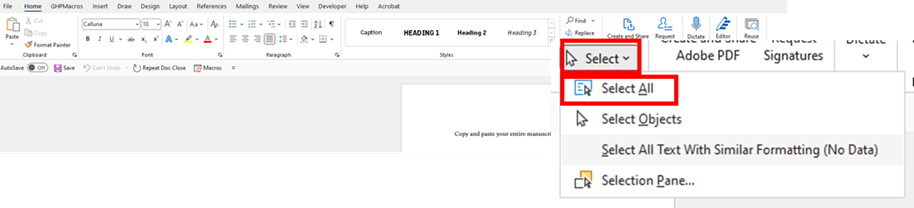
If you’ve written your manuscript in multiple files, open them one at a time, select and copy all the text, and paste it into our word template in the correct order. It’s important to note the last part of those instructions as the team at Green Hill will assume you’ve ordered your manuscript correctly.
Next, you’ll need to open your styles pane. To do this, go to “Home,” and click the downwards arrow in the styles section. The Styles Plane will open to the right of the screen.

You’ll then need to ensure that you are only seeing the styles that we have recommended as Word has its own inbuilt styles that we don’t need. To do this, go to the style pane and click “Options,” then choose “Recommended” from the first dropdown menu and click “OK.”
Now it’s time to use the styles to format your manuscript!
For fiction authors, applying styles to your manuscript should be straightforward as you shouldn’t have too much differentiation of text in your manuscript. However, for authors with complex manuscripts like business books, some non-fiction books, textbooks, etc. the process of deciding which style to use can get a little tricky.
At the end of the day, it is okay if you choose the wrong style so long as you are CONSISTENT.
Keep a notepad next to you and write down what styles you’re using for particular elements of your text. This way, if you’ve chosen the wrong style, the team at Green Hill will be able to switch it out for a more appropriate one much easier.
If you’re not familiar with styles in Microsoft Word, don’t be daunted! We will go through how to use them step-by-step and if you still don’t quite understand, there is an instructional video you can watch.
Firstly, open up the Styles Guide document from your Green Hill Submission Guideline Documents folder. It’s a PDF which has a lot of information about how to set up your document for styling, how to use styles, and a styles A-Z. Right now, we’re interested in the Styles A-Z chapter, so skip down to there.
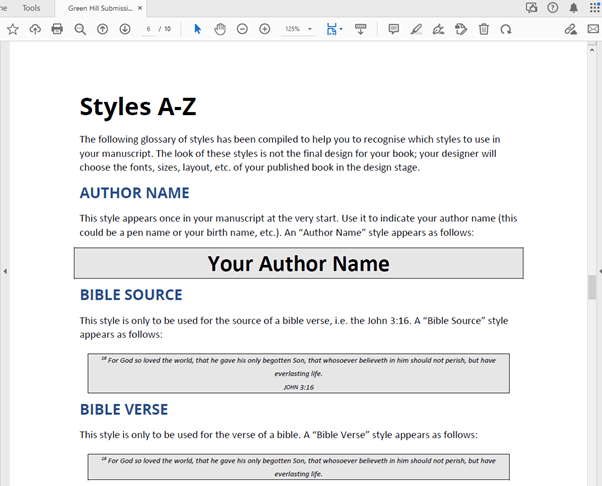
The Styles A-Z chapter runs through every style in your template and what it is typically used for. As your final design of your book won’t look like your formatted manuscript, don’t worry too much about the look of the styles. When deciding on a style, it’s always best to choose based on their described use.
When getting ready to use styles, it’s a good idea to either print out the Styles A-Z chapter or to have your screen split between these two documents. This is so that you can view both at the same time, allowing you to quickly reference the styles A-Z document while you format your manuscript.

Have a scroll through the different styles and make a note of which ones look appropriate for your manuscript. Once you’ve done that, it’s time to finally get formatting!
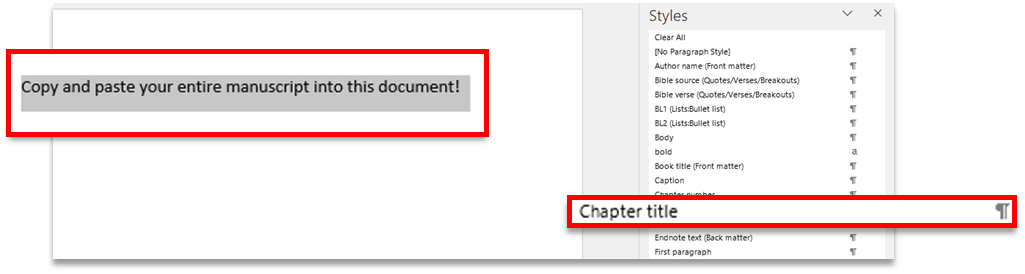
To apply a style, highlight the paragraph you want to change and then scroll through the styles pane until you find the appropriate style, then simply click on it. Go through the whole manuscript and do this for every paragraph.
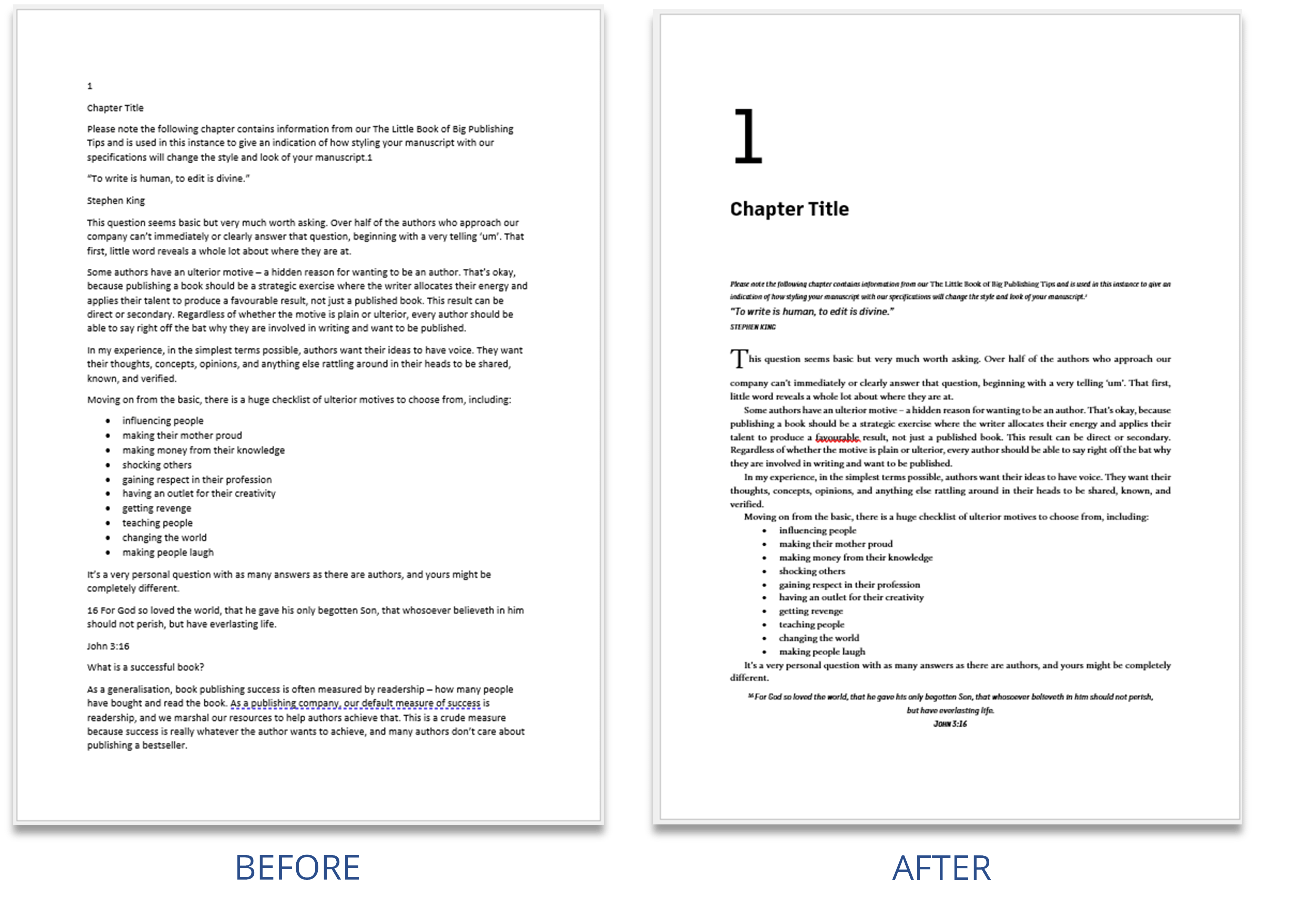
On our company website, we have a webpage dedicated to submitting your manuscript. It briefly details the steps that need to be undertaken and also features a helpful video tutorial that will walk you through the process.
You can find this webpage here: https://greenhillpublishing.com.au/submit-your-manuscript/
The page you requested could not be found. Try refining your search, or use the navigation above to locate the post.
The page you requested could not be found. Try refining your search, or use the navigation above to locate the post.